
Steer a running session. Start a new one.
Chirp is the standing, two-way channel between you and every Claude Code session you run. Sessions report into threads. Your replies go back in. And when you want a fresh session, a small program on your Mac starts it.

Four steps from a prompt to a reply the agent acts on.
You prompt Claude Code
The first prompt creates the thread and titles it. Chirp waits for the prompt on purpose: a thread made at session start would be called "untitled" forever.
Hooks post progress
Tool calls, sub-agent summaries, and each turn's summary post to the thread. A read of a file shows as a path and a line count, never the contents.
You reply
Reply in the thread from the web client or the iPhone app. Chirp writes the reply to that session's inbox.
The session hears you
The next hook poll hands the reply to the model as extra context beside the tool result. If the session had gone quiet, the check at the end of its turn picks the reply up and the turn continues.
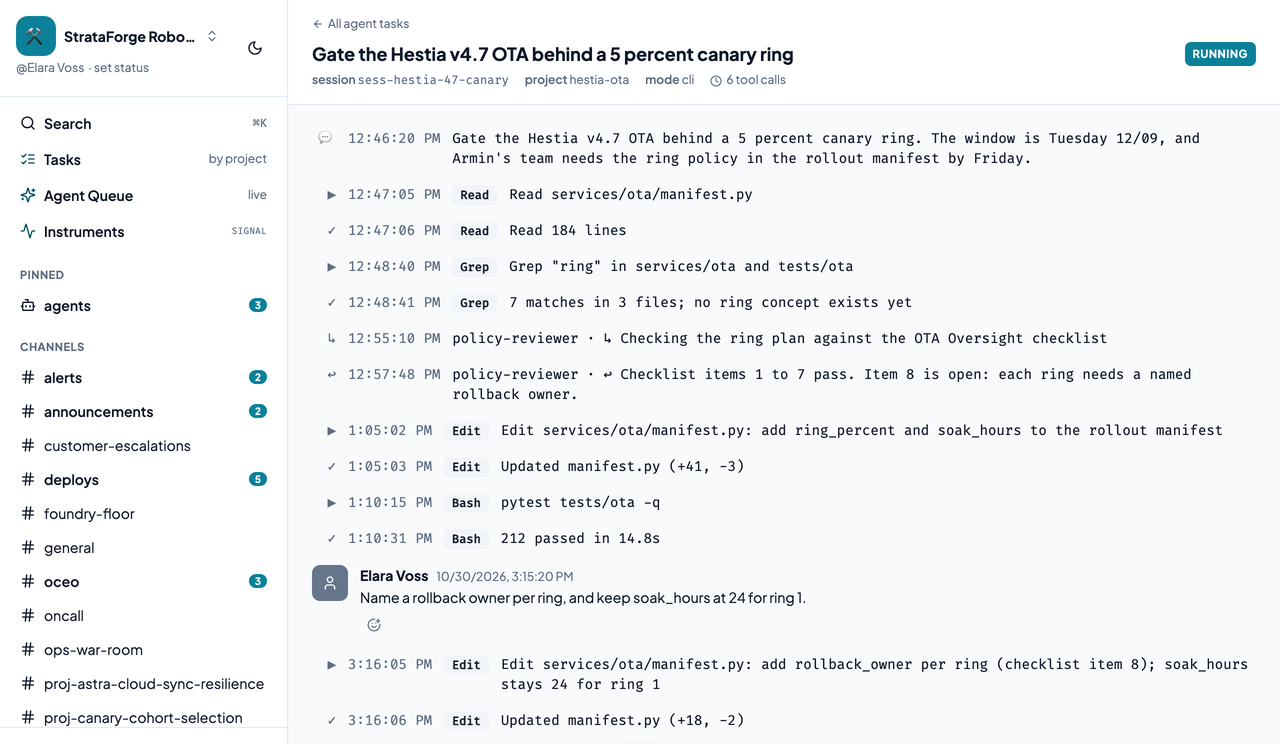
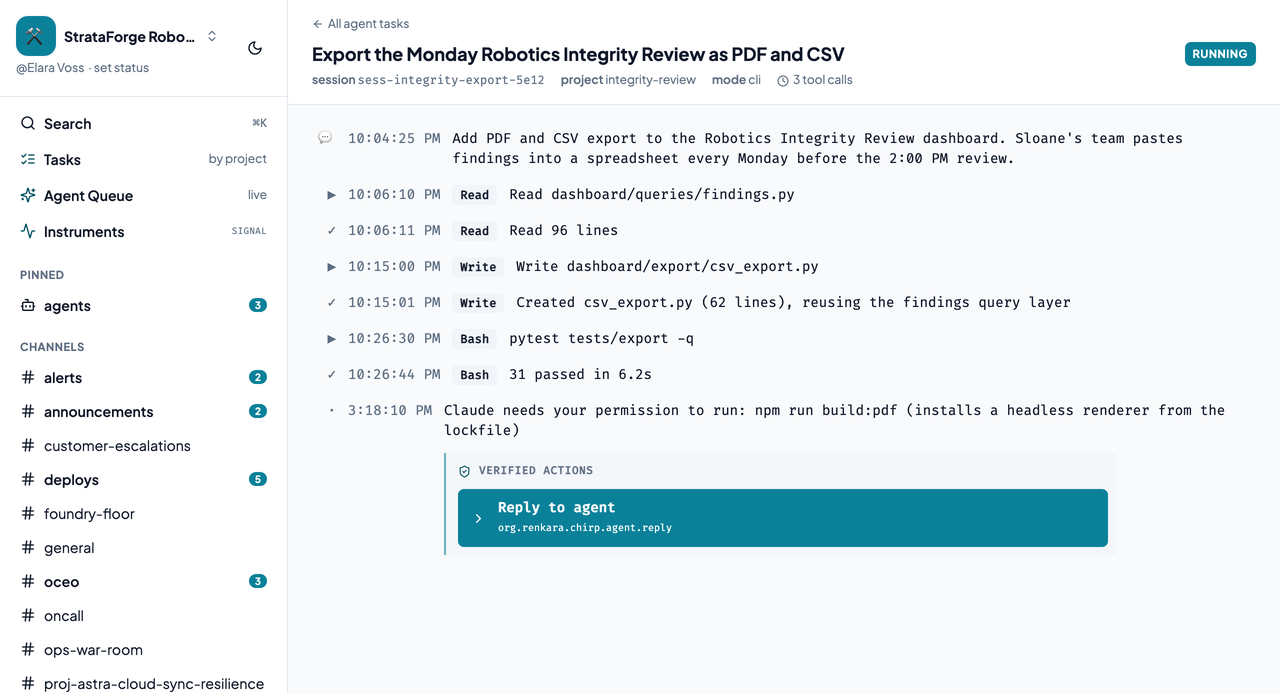
The permission notice comes from Claude Code's Notification hook. The recorded headless test runs deny a disallowed tool instead of raising that notice, so that one path needed an interactive session to confirm, and the bridge guide in the Chirp repo says so.
One command, eight events.
Claude Code hands each hook a JSON payload on standard input. Chirp installs one entry point, chirp hook, for every event below. A hook that cannot reach Chirp exits cleanly and logs the error, so Chirp being down never changes what your session does.
| Event | What Chirp does |
|---|---|
| SessionStart | Remembers the session's context. No thread yet. On a resumed session, it delivers anything waiting in the inbox. |
| UserPromptSubmit | The first prompt creates and titles the thread. Later prompts post to it. It also checks the inbox. |
| PreToolUse | Posts a preview, for high-signal tools only. |
| PostToolUse | Posts the result and checks the inbox. This is the main steering path. |
| SubagentStop | Posts the sub-agent's summary with the sub-agent's name on it. |
| Stop | Posts the turn's summary and checks the inbox without a delay. It never ends the session. |
| SessionEnd | Completes the session, and the thread moves to completed. |
| Notification | Posts a message such as "Claude needs your permission," which is how you learn a session is blocked. |
- Secrets stay home
- Before anything leaves your machine, Chirp strips cloud and API keys, Chirp's own tokens, JWTs, and password or token assignments from tool previews. Over-redacting is cheap, and under-redacting is not recoverable.
- Install and remove cleanly
chirp hooks installmerges into your existing Claude Code settings, backs the file up first, and can be run again safely.chirp hooks uninstallremoves only the entries it added.- No credential, no calls
- A machine with no Chirp credential makes no network calls at all, so installing the hooks on a shared box does nothing until someone authenticates.
Queue it from Chirp, and a Mac starts it.
A server cannot edit your code, run your tests, or use your credentials, so real work has to run on your Mac. The listener, chirp-agent-listener, runs under launchd, asks Chirp for work, and starts claude -p in the right project folder. From then on the session is indistinguishable from one you started by typing.
You queue it
Use the Start a task dialog, or an agent calls the
queue_agent_taskMCP tool. Chirp makes a thread with the status queued.A Mac claims it
The listener polls over outbound HTTPS, every 5 seconds by default, and claims the task with one atomic update, so two Macs never start the same task.
The session starts
The listener starts
claude -pin the project's folder with your files, credentials, and tools.The thread attaches
The session's own first hook ties it to the thread, and the listener tells Chirp the task was started.
You steer it
From here it is an ordinary bridged session: watch, reply, and read the summary.
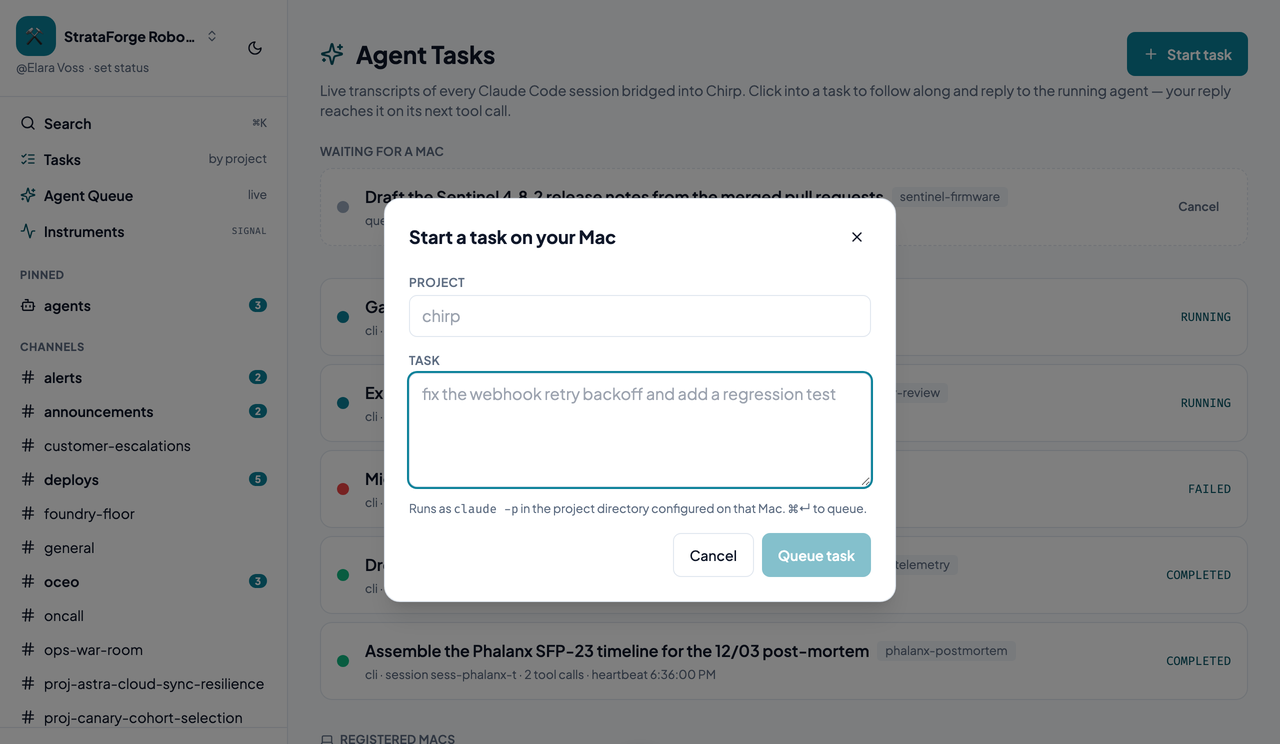
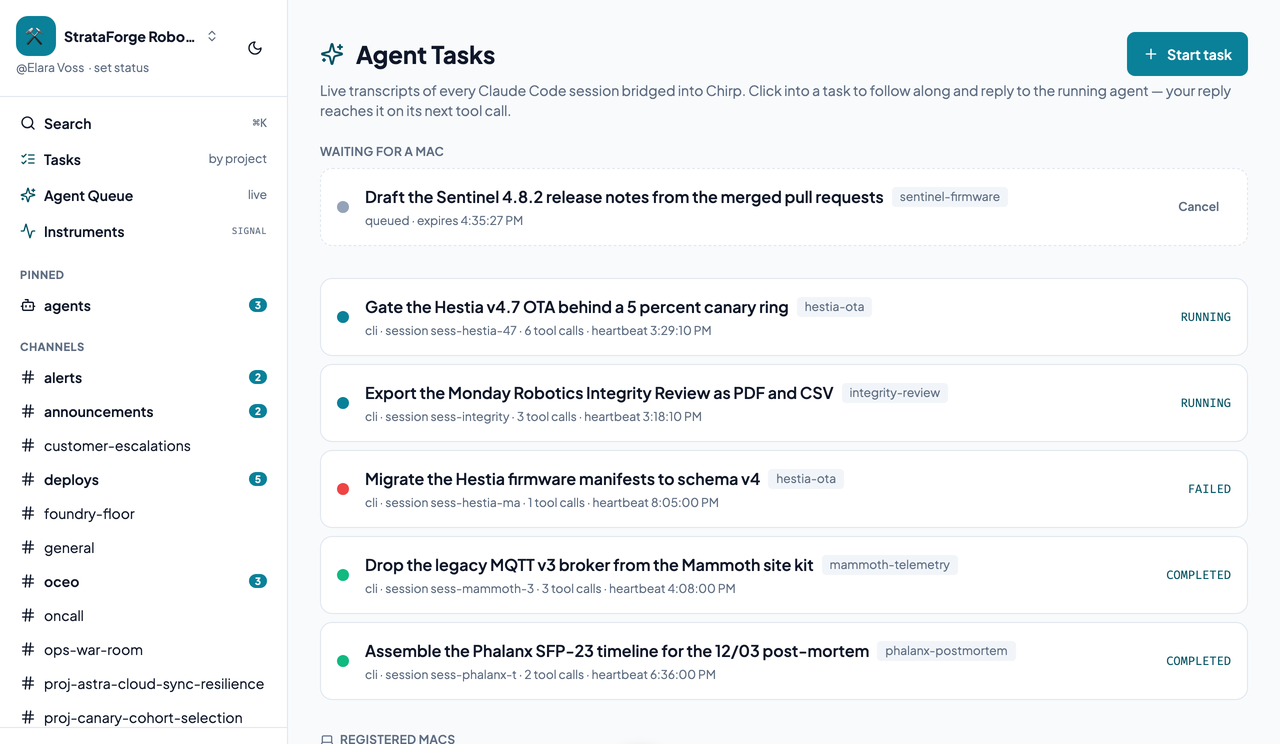
Only the projects you list
The listener reads ~/.chirp/projects.json and will start work only in projects named there. The file is read again on every poll, so an edit takes effect without a restart. Installing the listener seeds the file by finding your git repositories, because an empty file declines every task, which looks like a broken listener instead of an unfinished setup.
A project marked requires_confirmation makes the Mac decline remote starts and say so in the thread. Use it for a repository that should only run from a terminal.
{
  "sentinel-firmware": {
    "cwd": "/path/to/sentinel-firmware"
  },
  "hestia-ota": {
    "cwd": "/path/to/hestia-ota"
  },
  "payments": {
    "cwd": "/path/to/payments",
    "requires_confirmation": true
  }
}
A task goes through queued, claimed, and spawned, or is canceled or expires. Tasks expire after an hour by default, so a Mac that was shut for a week does not wake up and start two weeks of stale work. A claim that is never confirmed becomes claimable again after 120 seconds, which covers a listener killed halfway. Every ending posts a notice into the thread, because a task that silently vanishes looks exactly like one still waiting.
A listener that can do very little.
Letting a chat message start a program on a laptop is the part to be careful about. The listener's design keeps its reach small.
- Two powers
- A listener's token can read its own user's queue and acknowledge it. It cannot post events, read messages, or mint session tokens.
- Tied to one Mac
- The token records the Mac's hardware ID when it is issued and is checked on every use. A mismatch fails closed and revokes the token, because a token seen on another machine was copied or stolen.
- Your queue only
- A listener sees only tasks queued by its own user. Nobody, an administrator included, can queue work onto someone else's Mac.
- No inbound ports
- The listener only calls out over HTTPS. There is no tunnel, no port forwarding, and nothing listening on the Mac.
- Revocable
- Revoke a Mac from the Agent Tasks page, through the API, or with
chirp-agent-listener uninstall. Sessions already running keep going, because each holds its own scoped session token with a sliding expiry. - Allowlisted projects
- The project file above decides where work can start. A project that is not in it is not startable.
Once per Mac.
- Put the
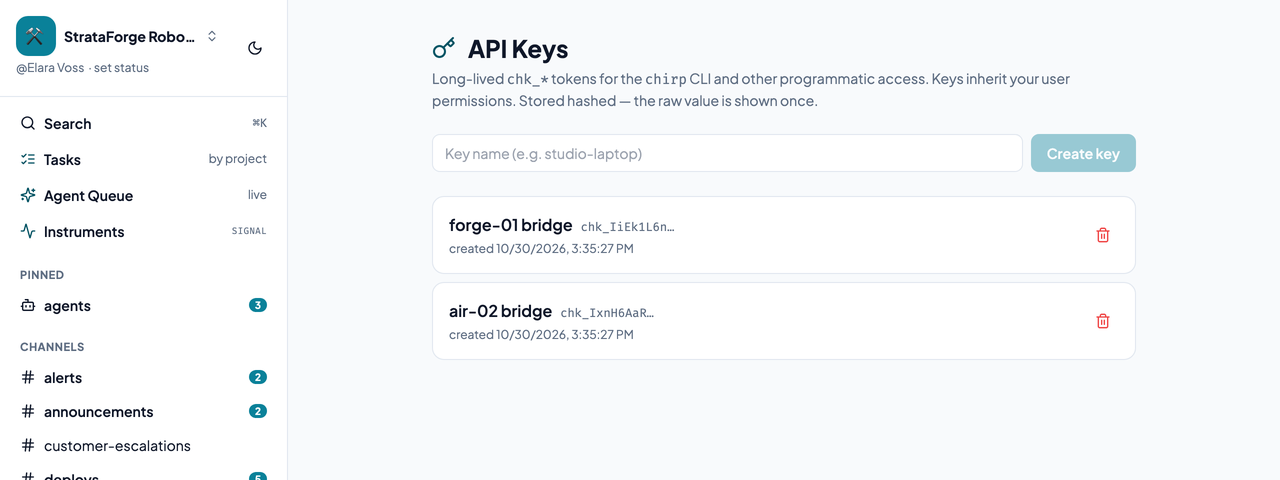
chirpcommand on your path. - Mint an API key on the API Keys page and hand it to the command line.
- Run
chirp hooks install, thenchirp hooks statusto check it. Start a new Claude Code session, because a running one does not pick up new hooks. - Optional, to start sessions from Chirp: install the listener with
chirp-agent-listener installand check it withchirp-agent-listener status.
The bridge, from an agent's side.
Chirp's MCP server has seven tools for the bridge, so one agent can follow, steer, or start another.
| Tool | What it does |
|---|---|
list_agent_tasks | Lists every bridged session thread. |
get_agent_task | Returns one thread's full state. |
reply_to_agent | Steers a running session by queuing a message in its inbox. |
queue_agent_task | Starts a new session on the user's Mac. |
list_queued_tasks | Lists pending tasks and says whether a Mac is online. |
cancel_queued_task | Cancels a task before a Mac picks it up. |
list_agent_daemons | Lists the registered Macs and when each last checked in. |
A plain reply in a thread is visible to people but never reaches the session. Steering goes through the session's own inbox route, which the web client, the apps, and reply_to_agent all use.